Why the ERESOLVE error happens
Astro 7 depends directly on Vite 8. astro@7.1.3’s published dependencies on npm list "vite": "^8.0.13" as a direct dependency, not a peer. The official Astro v7 upgrade guide covers this change. The moment you run npm install, npm resolves that Vite version first, then checks every other package’s peer dependency against it.
npm has refused to silently paper over a peer dependency conflict by default since npm 7. If any plugin in your tree still declares something like "peerDependencies": { "vite": "^6.0.0 || ^7.0.0" }, with no ^8.0.0 in the range, npm has no valid version left to install and stops with ERESOLVE instead of guessing.
vite-plugin-pwa hit exactly this. Version 1.2.0, published 2025-11-27, still capped its Vite peer range at ^7.0.0. Issue #923 asked for Vite 8 support in March 2026, and version 1.3.0, published 2026-05-05, added it. A project still pinned below 1.3.0 hits the same wall today. The same shape of error appears for any other plugin whose peer range hasn’t caught up yet.
Fix it: update the plugin, not just the flag
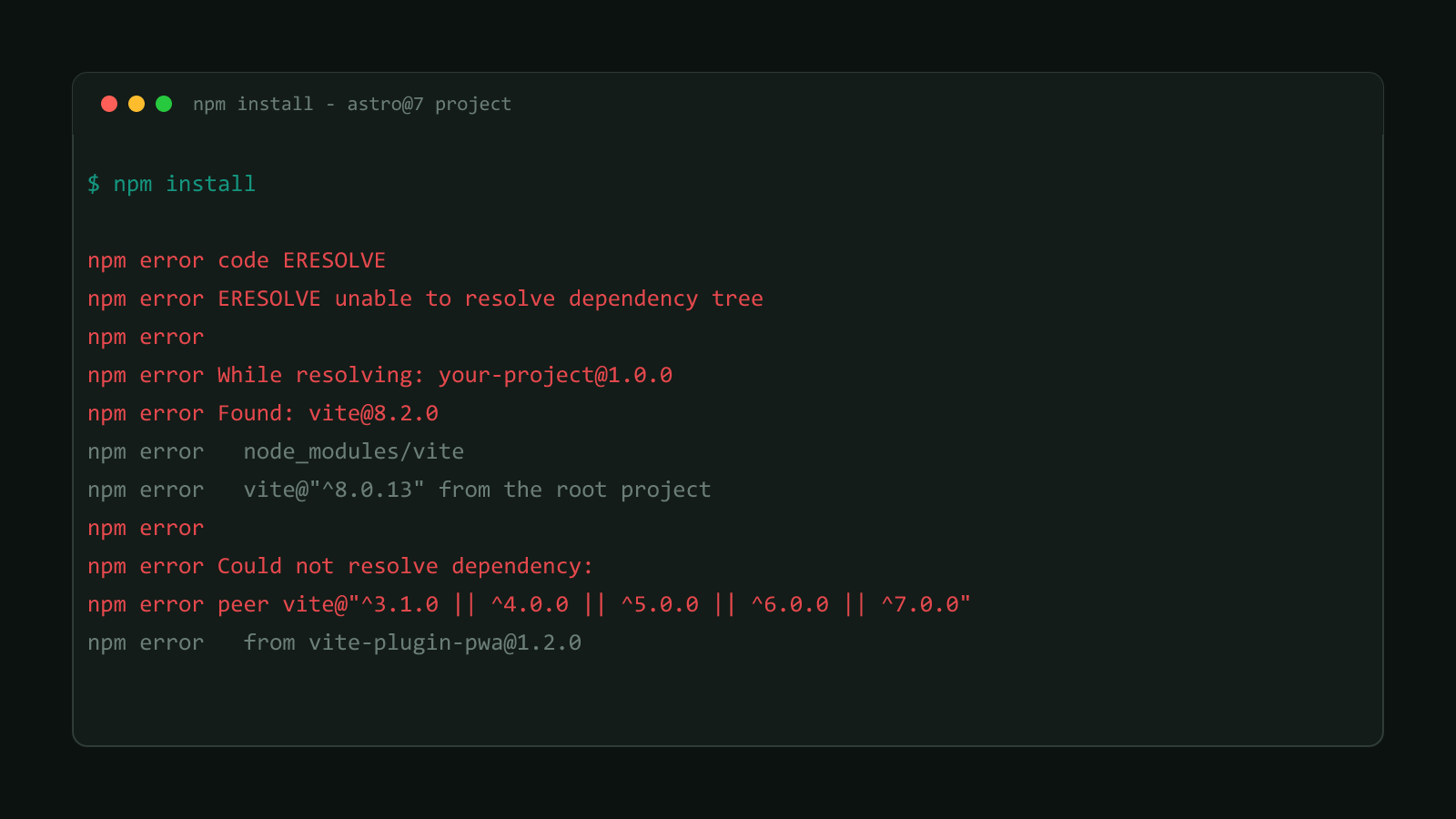
Before: the real error
npm error code ERESOLVE
npm error ERESOLVE unable to resolve dependency tree
npm error
npm error While resolving: your-project@1.0.0
npm error Found: vite@8.2.0
npm error node_modules/vite
npm error   vite@"^8.0.13" from the root project
npm error
npm error Could not resolve dependency:
npm error peer vite@"^3.1.0 || ^4.0.0 || ^5.0.0 || ^6.0.0 || ^7.0.0" from vite-plugin-pwa@1.2.0
npm error node_modules/vite-plugin-pwa
npm error
npm error Fix the upstream dependency conflict, or retry
npm error this command with --force or --legacy-peer-deps
Trimmed to the conflict that matters. Vite’s own optional peer dependencies add a few more lines in the real output, but this is the line that actually blocks the install.
After: upgrade the plugin, then reinstall
npm install vite-plugin-pwa@latest
npm install
The first line is the actual fix. It moves vite-plugin-pwa to a version whose peer range includes ^8.0.0, which satisfies the Vite version Astro 7 already installed. The second line is just a normal reinstall to confirm the tree now resolves cleanly.
--legacy-peer-deps is a workaround, not a fix
It tells npm to install the mismatched versions anyway instead of stopping. The plugin still runs against a major Vite version it was never tested against, so anything that touches Vite’s plugin API internally can break in ways npm will no longer warn you about. Use it to keep working while you wait on an upstream update, then remove it once that update ships.
Confirmed version range
Verified against this site’s own astro@7.1.3, which declares vite@^8.0.13 as a direct dependency. A dry-run install against vite-plugin-pwa@1.2.0 fails with the exact error above. Version 1.3.0’s published peerDependencies range already includes ^8.0.0, which is what removes the conflict once you upgrade to it.
This pattern isn’t unique to vite-plugin-pwa. Any Vite plugin whose package.json hasn’t shipped an update adding ^8.0.0 to its peer dependency range will produce the identical error shape the moment it sits in a project next to Astro 7.
Check the plugin’s own changelog or issue tracker before reaching for --legacy-peer-deps as a permanent fix. If Vite 8 support has already shipped, a plain version bump is the real fix and takes about the same amount of time. Browse more posts like this in the Guides & Fixes archive.